SKU:10GBD9921
Elgato Stream Deck + XLR Bundle
Elgato Stream Deck + XLR Bundle
4 in stock
Couldn't load pickup availability
Description
Description
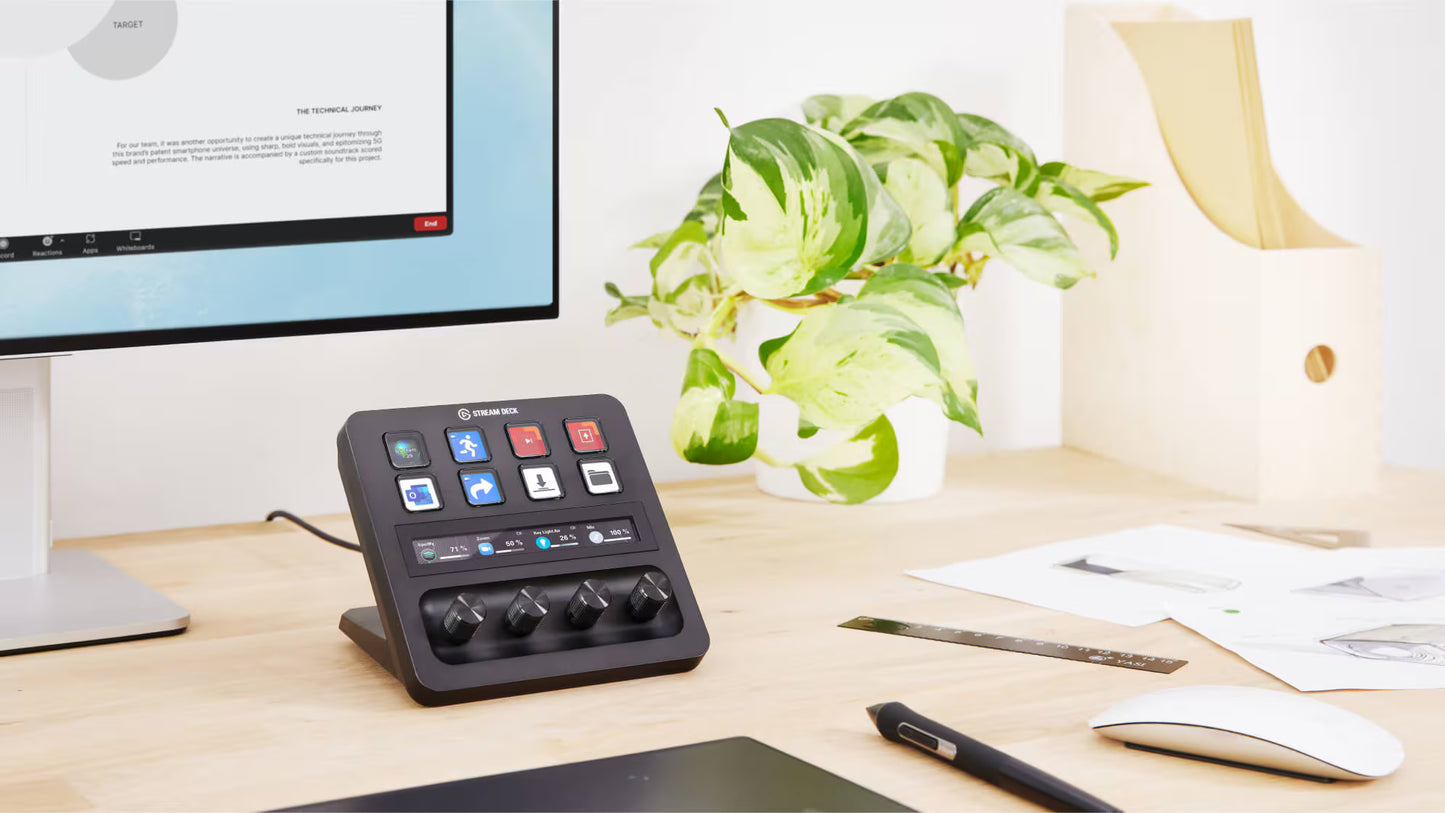
Simplify your streaming workflow with Elgato's Stream Deck + XLR Bundle. With eight customizable LCD keys, four programmable dials, and a central touchscreen strip, you can switch scenes, launch media, and adjust audio or video settings instantly. Together, these tools deliver a powerful, customizable solution for creators who want pro-level control at their fingertips.
Stream Deck + - All the feels for a fast, smooth, intuitive workflow
Iconic Stream Deck tech with customizable LCD keys, dials, and touch strip. Stream Deck + is your audio mixer, studio controller, production console – anything you want it to be.
One Interface To Rule Them All
Stream Deck + gives you incredible powers to interact with your setup. Instant, tactile, granular control. Limitless customization. Plugins galore. Make it yours. Master your craft.
Tap
Trigger almost any action you want — switch cameras, mute your mic, launch apps, apply sound effects, turn on lights, change scenes, and much more.
Turn
Adjust volume levels, image details, camera zoom, brightness, white balance — any incremental app settings. Push to cycle through dial actions.
Touch
Control apps with a touch, swipe to change pages, and see dial information at a glance.
Your Audio Station
Get hands-on control for all your audio sources. Stream Deck + unlocks thousands of royalty-free tracks, sound effects, and powerful Wave Link mixing software.
Your Production Console
Go live, pan, zoom, change scenes, and more. Scrub, trim, and cut in post. It's a full-scale production crew on your desktop.
Your Studio Controller
Lights, camera, satisfaction. Set the scene for perfect audience engagement, immersive creativity, or mellow chat and chill. Your favorite settings are a tap or twist away.
Anything You Want It To Be
Install over 200 ready-made plugins or map keyboard shortcuts to keys and dials. Stream Deck + integrates with any workflow from video creation, podcasting and live production to photo editing, graphic design, and beyond. Welcome to the world of Stream Deck.
Productivity Hub
Hack your workflow and professionalize your video calls
Creative Toolkit
Select tools and execute functions in Photoshop
Pro Color Panel
Control all color parameters with precision in DaVinci Resolve
Stream Controller
Take command and engage your audiences like never before
DAW Control Surface
Master your Ableton Live sessions with speed and accuracy
Your Discord Companion
Easily adjust audio and maneuver around servers
Trigger chain reactions
Launch multiple actions intermittently or all at once. Start stream, welcome your chat, play intro sequence, unmute mic — all with one key press.
Your entire setup at your fingertips
Create up to ten pages of console layouts and swipe through them on the fly.
Get creative
Make keys pop with icons, kit out dials with custom caps, and furnish your touch strip with backgrounds.
XLR DOCK
Create the ultimate audio station with XLR Dock, an accessory that slots directly into the back of your Stream Deck +.
EXPAND YOUR SETUP
With the USB Hub accessory, connect up to four devices and charge your laptop via hidden ports behind Stream Deck +.
Setting up shouldn’t get in your way
Drag actions onto keys and dials. Then personalize settings with ease.
Stay in the flow
One moment you're live. Next you're cutting YouTube shorts. With Smart Profiles, Stream Deck + automatically switches action layouts as you jump between apps.
A hybrid mixer like no other
Stream Deck + and Wave Link are made for each other. Tap to mute channels or trigger SFX. Turn to adjust your mic volume, see levels at a glance, and more.
Eight keys. Limitless actions.
Turn keys into folders for quick access to task-related actions. One for OBS, one for Wave Link, another for Discord, lighting apps, and so on.
Four dials. Limitless control.
Equip dials with as many actions as you want, and push to cycle through them.
THE DEVICE YOU LOVE. IN A STYLE YOUR OWN.
Install community plugins and icons directly to your Stream Deck app. Then personalize each key with actions and profiles tailored to your workflow.
XLR DOck for Stream Deck +: Mic interface for Stream Deck +
Equipped with XLR Dock, Stream Deck + becomes the ultimate audio station. In back, plug in your XLR microphone for studio-like sound. Up front, customize controls to mix, monitor, or do just about anything. It's all your audio in one place, saving you focus and desk space.
Your Audio controller
Adjust mic gain, mute Spotify, or switch from speakers to your headset
Your Mic Interface
Connect your high-end XLR microphone to any computer
Together As One
So you can free up desk space and do even more from one device
Mini Profile, Big Sound
Not to be underestimated, XLR Dock does everything a professional audio interface can do—and then some.
Studio Preamp
Sound loud and clear without boosters or lifters
Phantom Power
Brings condenser microphones to life with 48 V
Never Clip Again
When you get loud, Clipguard prevents distortion
Zero-Latency Monitoring
Plug in headphones to hear yourself in real time
One Connection
Everything's powered by a single USB cable
It's your mixer. Soundboard. Sampler. And So Much More
Stream Deck + and XLR Dock bring all your audio controls together—not just hardware, but also your apps. Tap to use a voice changer or push to talk in Discord. Turn to adjust headphone volume. Even monitor audio levels in real time. Everything is customizable and it's all in one place.
A Snap To Assemble
Short on DIY skills? No problem. XLR Dock installs in a few easy steps using only a Phillips screwdriver.
FAQ
Can I use XLR Dock without Stream Deck +?
No, XLR Dock is special-made for Stream Deck + and can’t be used independently.
Can I connect any XLR microphone?
Yes, with up to 75 dB of gain and 48-V phantom power, XLR Dock is equipped to handle a wide range of dynamic and condenser mics.
Do I need any special drivers or software?
To use XLR Dock, make sure you're running the latest version of Stream Deck app. For additional audio settings or controls, like multi-channel mixing and effects, get the free Wave Link app.
How do I mute my microphone?
Stream Deck + makes muting your mic as simple as a tap. The fastest way is using Volume Controller plugin, which comes preloaded in Stream Deck app when you first connect XLR Dock. Alternatively, if you use Wave Link, mute your microphone with a touch using the Wave Link plugin
Can I adjust mic gain?
Sure can. In Stream Deck app, drag over a gain-control action onto any open dial using either Volume Controller or Wave Link plugin. Then turn the corresponding dial to adjust your gain as needed.
How do I turn on phantom power for my condenser mic?
Once XLR Dock is set up in Wave Link app, select the dropdown to open its settings panel. Inside, select the 48V Phantom Power checkbox to power your condenser microphone.
How do I turn on Clipguard?
Clipguard is enabled by default when you first set up XLR Dock. You can toggle this setting on and off in Wave Link app; however, for best audio quality, we recommend keeping Clipguard on at all times.
Can I monitor audio levels in real time?
Sure, it's easy. With Wave Link plugin for Stream Deck +, dial actions automatically display your current levels. So you can monitor audio in real time with a quick glance.
Can I add effects like EQ and compression?
Sure can. Once you install Wave Link, visit Elgato Marketplace to start exploring audio effects. Then install your favorites to Wave Link with a few clicks
Is a warranty included with my purchase?
Sure is. When you buy XLR Dock in its original packaging, you’re covered by a two-year limited warranty. It’s important to note, though, that in the United States, this warranty is only valid when purchased from Elgato.com or an Elgato-authorized reseller.
Where can I find help if I run into issues?
Don’t worry, you’re in good hands. For fast solutions, ask our active communities on platforms like Discord, Reddit, or X—where fellow creators and professionals are ready to help. Additionally, our help center and YouTube tutorials are great resources for troubleshooting. If you still need a hand, get in touch with our experts.
Specifications
Specifications
STREAM DECK TECH SPECS
- SIZE: 140 x 138 x 110 mm | 5.5 x 5.4 x 4.3 in
- WEIGHT: 465 g | 1 lb
- KEYS: 8 x customizable LCD keys
- MULTIFUNCTION DIALS: 4 x 360° encoders with push function
- LCD TOUCH PANEL: 108 x 14 mm | 4.2 x 0.5 in
- INTERFACE: USB 2.0
- WINDOWS: Windows 10 (64-bit) or newer
- MAC: macOS 13 or newer
XLR DOCK FOR STREAM DECK + TECH SPECS:
- FREQUENCY RESPONSE: 20 Hz – 20 kHz
- DYNAMIC RANGE:100 dB (120 dB with Clipguard)
- EQUIVALENT INPUT NOISE (EIN): -130 dBV at 60 dB gain
- GAIN RANGE: 0 – 75 dB
- PHANTOM POWER: 48 V DC, 7 mA
- MAX INPUT LEVEL: 10 V at 0 dB gain (with Clipguard)
- MAX OUTPUT LEVEL: 77 mW
- RESOLUTION: 24-bit
- SAMPLE RATE: 48 kHz
- INTERFACE: USB 2.0, Type-C
- DIMENSIONS: 137 (W) x 115 (D) x 76 (H) mm | 5.39 x 4.53 x 2.99 in
- WEIGHT: 169 g | 5.96 oz
Included in the box
Included in the box
- Stream Deck +
- XLR Dock for Stream Deck +
- USB-C to USB-C Cable
- Quick Start Guide for each item
Learn more
Learn more