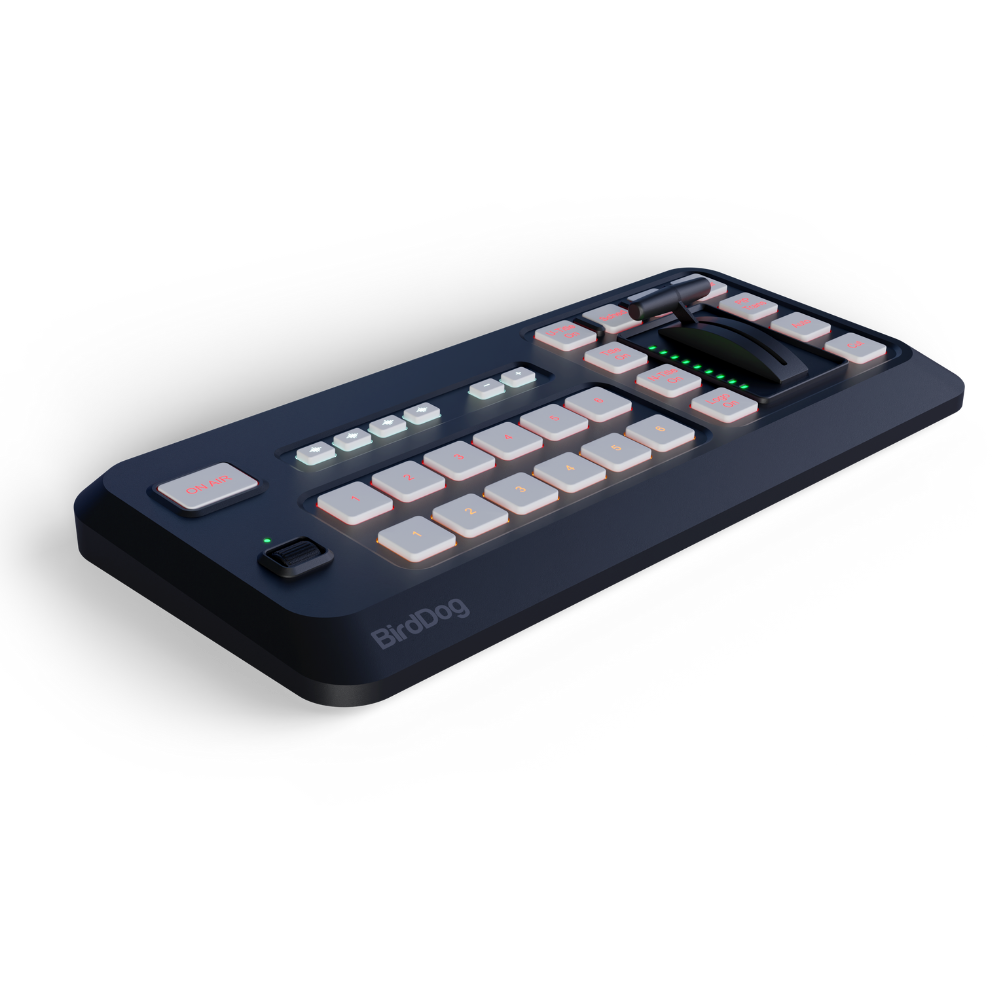
BirdDog Wingman Control Surface for NDI Live Production
BirdDog Wingman Control Surface for NDI Live Production
Low stock
Couldn't load pickup availability
SKU:BDMKCS
Manufacturer PN: BDMK-CS
Description
Description
BirdDog Wingman Control Surface for NDI Live Production
Take hands-on control of your live productions with the BirdDog Wingman Control Surface, a tactile control solution designed for streamlined multi-camera switching, transitions, graphics, and media playback. Paired with the BirdDog Wingman iPad app, it provides an intuitive, computer-free production workflow for live streaming, recording, and NDI-based video production.
The Wingman Control Surface gives operators physical controls for managing their productions, while the iPad app provides a visual interface for configuration, monitoring, and touchscreen operation. Connect NDI-enabled cameras over Wi-Fi or Ethernet to build a flexible production setup for live events, education, houses of worship, corporate communications, and online content creation.
Important: The BirdDog Wingman app can also operate without the physical Control Surface after purchase. An iPad is required to use the app.
Key Features
- Tactile Live Production Control: Use physical controls for hands-on camera switching and production management.
- Multi-Camera NDI Switching: Switch between NDI-enabled cameras with low latency for responsive live production.
- Computer-Free Workflow: Use the Wingman iPad app and Control Surface to manage your production without a dedicated computer.
- Wi-Fi and Ethernet Connectivity: Build a flexible setup using wireless or wired network connections.
- NDI and NDI|HX Support: Work with supported high-bandwidth NDI and NDI|HX video sources and outputs.
- Live Streaming and Recording: Stream to supported platforms, including YouTube, Facebook Live, and Vimeo, or record locally to your iPad or a supported USB device.
- Multichannel Audio Mixing: Mix embedded camera audio, USB audio, music, video files, and program output.
- Graphics and Titles: Add titles, captions, lower thirds, logos, URL-based graphics, and NDI graphics.
- Picture-in-Picture and Media Playback: Combine camera feeds, videos, and images using 14 presets, with support for static and motion backgrounds.
- Live Telestrator: Draw and annotate over the program feed, capture snapshots, freeze the image, and clear annotations.
- Built-In Scopes: Monitor video using live scopes accessible from the program preview.
- Flexible iPad Control: Use the touchscreen interface for setup and monitoring, with the physical Control Surface providing additional tactile control.
Professional Live Production Control with BirdDog Wingman
The BirdDog Wingman Control Surface is designed to make live production more accessible and efficient. Its combination of physical controls and an intuitive iPad interface helps operators manage multiple cameras, media, audio, and graphics without relying on a traditional computer-based production system.
Whether you're producing a live event, streaming a presentation, creating educational content, or managing a multi-camera broadcast, Wingman provides flexible tools for building a polished production workflow.
Multi-Camera Switching and NDI Workflows
Connect compatible NDI-enabled cameras over Wi-Fi or Ethernet to create a flexible multi-camera production environment. BirdDog Wingman supports workflows using high-bandwidth NDI and NDI|HX, helping operators manage network video sources for live switching and streaming.
The wired or wireless connection options make it adaptable to different production spaces, from permanent installations to mobile setups. For wired Ethernet connectivity with an iPad, a compatible USB-C-to-Ethernet adapter may be required and is sold separately.
Graphics, Transitions, and Media Playback
Add production value with tools for creating dynamic, engaging video content. Wingman supports picture-in-picture layouts, media playback, customizable titles, captions, lower thirds, and advanced transitions such as fades and stingers.
Use its three independent graphics layers—Title Editor, URL and NDI Graphics, and Logo Layer—to build a more polished on-screen presentation. With 14 picture-in-picture presets and support for images, videos, and custom backgrounds, you can adapt your production to different formats and audiences.
Audio Mixing, Monitoring, and Live Annotation
Manage audio from multiple sources, including embedded camera audio, USB audio, music, video files, and the final program output. Built-in video scopes help you monitor your program feed, while the live telestrator lets you draw, highlight, and annotate content in real time.
These tools are useful for presentations, demonstrations, educational streams, and productions where visual explanations or on-screen emphasis improve the viewing experience.
Stream Live or Record for Later
Use BirdDog Wingman to stream to supported platforms such as YouTube, Facebook Live, and Vimeo, or record content locally for later editing and distribution. Recording options depend on the connected storage and supported device configuration.
The computer-free workflow is designed for creators and production teams who want to simplify their setup while retaining hands-on control over switching, graphics, audio, and media.
How to Set Up the BirdDog Wingman Control Surface
- Purchase the Control Surface: Start with the BirdDog Wingman Control Surface for physical production controls.
- Download the iPad App: Install the BirdDog Wingman app on a compatible iPad for configuration, monitoring, and touchscreen operation.
- Connect Your Cameras: Connect compatible NDI-enabled cameras over Wi-Fi or Ethernet. A compatible USB-C-to-Ethernet adapter may be required for wired iPad connectivity and is sold separately.
- Configure Your Production: Set up your camera sources, graphics, audio, transitions, and media playback.
- Stream or Record: Go live on a supported streaming platform or record your production for later use.
Who Is the BirdDog Wingman Control Surface For?
The BirdDog Wingman Control Surface is suitable for content creators, educators, houses of worship, corporate AV teams, and live production operators looking for a flexible NDI-based switching and streaming workflow.
Its combination of tactile controls, iPad-based operation, graphics tools, audio mixing, and media playback makes it an option for productions that need multi-camera control without a dedicated computer-based switching system.
Build a more flexible live production workflow with the BirdDog Wingman Control Surface.
Specifications
Specifications
Bluetooth Control Surface
Source Selection Buttons
- 6 Program, 6 Preview
Transition Controller
- T-Bar
Dedicated Effects buttons
- Cut/Auto-transition/PIP-transition/T-Bar PIP Control
Dedicated Video overlay buttons
- Stinger transition/Title/Network Title/Bug Logo
Audio Preset
- 4x Recall Banks
Scroll Wheel
- Vertical nagivation control wheel
Power input
- USB-C Input
Power output
- USB-C output
Bluetooth
- Bluetooth-LE
MAKI Studio Application
NDI Support
- NDI® | HX & High Bandwidth NDI® inputs
Inbuilt Camera
- Supports on-board and UVC Web Cameras as addiitonal sources
No. of live inputs
- Up to 10 (iPad/iPhone processor dependent)
Local Video Output
- Apple Airplay/Native HDMI output/NDI | HX®/High Bandwidth NDI®
Streaming Output
- Direct Facebook Live, RTMP/RTMPS output
Streaming Output Quality
- Selectable - 3Mbps ~ 9Mbps
Streaming Resolution Support
- 428x240 ~ 1920 x 1080
No. of concurrent streaming destinations
- 3
Title formats
- Inbuilt Titler, HTML5, NDI with Transparency
GENERAL
Operating System
- iOS 15 or later
Platform Support
- iPhone, iPad, MacOS Limited support
Licensing
- Software downloadable from App store free or charge, Bluetooth Control Surface required to launch app
Included in the box
Included in the box
- BirdDog Wingman Control Surface for NDI Live Production
- Warranty: Limited 2-Year Manufacturer Warranty