Telestream Wirecast Pro (Perpetual)
Telestream Wirecast Pro (Perpetual)
In stock
Couldn't load pickup availability
SKU:WCPRO
Manufacturer PN: WC-PRO
Description
Description
Telestream Wirecast Pro (Perpetual) – Professional Live Video Production and Streaming Software
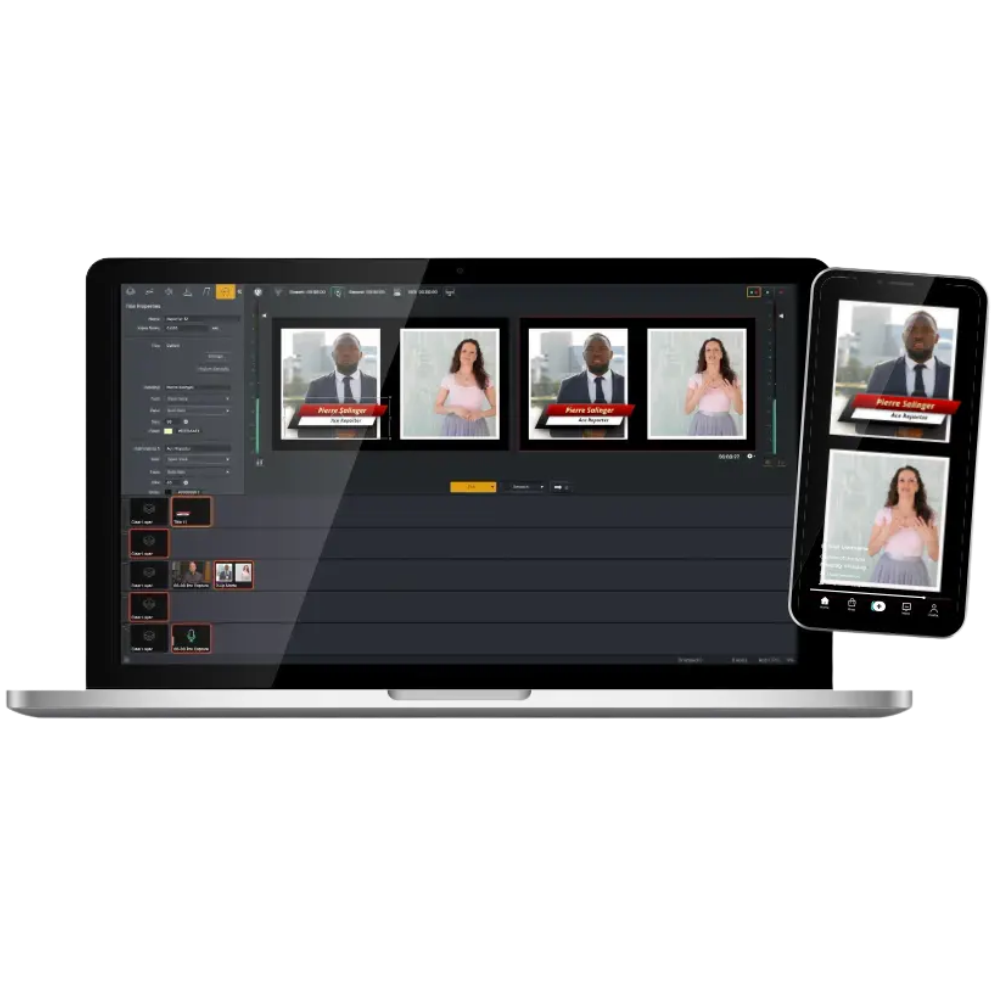
Telestream Wirecast Pro is advanced live video production, broadcasting, recording, and streaming software for Mac and Windows that transforms your computer into a professional broadcast studio. Capture unlimited video sources, switch between multiple cameras, incorporate graphics, mix multi-track audio, invite up to seven remote guests, and stream to multiple destinations simultaneously.
With advanced features including ISO recording, cloud multistreaming, integrated PTZ camera control, instant replay, and live sports scoreboards, Wirecast Pro is ideal for professional broadcasters, live event producers, sports organizations, houses of worship, educational institutions, and corporate production teams.
Key Features
- Perpetual software license for Mac and Windows
- Unlimited camera and video source inputs
- Support for USB, HDMI, SDI, IP, and NDI video sources
- Up to 250 graphic and production layers
- Built-in Rendezvous conferencing for up to 7 remote guests
- Cloud Multistreaming to multiple destinations simultaneously
- ISO recording of individual audio and video sources
- Independent mixing, routing, and recording of up to 8 audio tracks
- Native NDI video-over-IP support
- Integrated PTZ camera control via VISCA over IP
- Built-in instant replay, customizable scoreboards, and live game clocks
- GPU-accelerated chroma key and green screen compositing
- Built-in titles, graphics, transitions, and playlists
- Access to over 1 million royalty-free stock media assets
- Local recording of live program output
- Compatibility with select external hardware controllers
Professional Multi-Camera Live Video Production
Wirecast Pro combines live video switching, audio mixing, graphics, recording, and streaming into one comprehensive software-based production environment. Dynamically switch between live cameras, prerecorded videos, presentation slides, screen captures, and other media sources.
Build broadcast-quality productions with customized graphics, lower thirds, titles, automated stinger transitions, persistent playlists, and advanced multi-layer compositing.
Unlimited Video Sources and Camera Inputs
Connect unlimited video sources to create a flexible live production workflow. Wirecast Pro supports webcams, PTZ cameras, professional video cameras, capture devices, mobile video sources, and network-based video feeds.
Supported video sources include USB, HDMI and SDI capture devices, NDI network sources, screen captures, and prerecorded media files.
Native NDI Video-over-IP Support
Integrate NDI-compatible cameras, encoders, computers, mobile devices, and other network video sources directly into Wirecast Pro. Native NDI support simplifies video connectivity over a local network while reducing the need for dedicated video cabling and capture hardware.
Wirecast Pro is an effective solution for IP-based broadcasting, networked live production, and AV-over-IP workflows.
Cloud Multistreaming to Multiple Destinations
Reach audiences across multiple streaming platforms simultaneously with Wirecast Pro's Cloud Multistreaming capabilities.
Send a single stream to Telestream's cloud servers, which distribute your broadcast to multiple destinations, reducing the processing demands and upload bandwidth required by your production computer.
Supported streaming destinations include YouTube, Facebook Live, Twitch, X, and custom RTMP or SRT destinations.
Professional ISO Recording
Capture individual audio and video sources independently while producing and streaming your live broadcast. Wirecast Pro's ISO recording capabilities allow production teams to save isolated camera feeds and audio sources directly to local storage.
ISO recording provides greater flexibility for post-production editing, content repurposing, highlight creation, and broadcast archiving.
Advanced Multi-Track Audio Mixing and Recording
Take greater control of your production audio with independent routing, mixing, and recording of up to eight distinct audio tracks.
Manage microphones, camera audio, remote guest feeds, music, and other audio sources within a single production environment. Support for professional ASIO and WASAPI audio interfaces enables flexible integration with external audio equipment.
Invite Up to 7 Remote Guests with Rendezvous
Wirecast Pro includes built-in Rendezvous video conferencing, allowing up to seven remote guests to participate in a live broadcast through a simple browser invitation.
Guests can join without downloading additional software, with support for HD video and remote screen sharing. Rendezvous is ideal for live interviews, video podcasts, panel discussions, webinars, virtual conferences, and remote presentations.
Integrated PTZ Camera Control
Control compatible pan, tilt, and zoom cameras directly within Wirecast Pro using built-in VISCA over IP integration.
Adjust camera positioning and framing without leaving your production software, helping streamline multi-camera workflows and reduce the need for separate PTZ camera controllers.
Professional Live Sports Production
Wirecast Pro includes dedicated sports broadcasting tools designed to deliver professional live game coverage without requiring separate replay or scoreboard systems.
Built-in sports production capabilities include:
- Instant replay
- Customizable live scoreboards
- Live game clocks
- Multi-camera switching
- Branded graphics and overlays
- ISO recording for post-game editing and highlights
These capabilities make Wirecast Pro ideal for school athletics, collegiate sports, professional sporting events, and sports broadcasting organizations.
Professional Chroma Key and Green Screen Production
Create customized virtual backgrounds and professional visual compositions using Wirecast Pro's GPU-accelerated chroma key engine.
Remove solid-color backgrounds in real time to create virtual studios, branded presentation environments, news broadcasts, and immersive visual experiences.
Advanced Graphics, Titles, and Media Compositing
Build visually engaging productions with up to 250 graphic and production layers. Combine live video, images, lower thirds, logos, titles, presentation slides, and prerecorded content within a customizable production workspace.
Advanced transitions, playlists, and compositing tools help create consistent, broadcast-quality productions.
Royalty-Free Stock Media Library
Wirecast Pro provides access to a stock media library featuring over one million royalty-free media assets, including video clips, audio tracks, and graphics.
Incorporate professional media directly into broadcasts, introductions, transitions, presentations, and branded productions without sourcing every asset separately.
External Hardware Controller Integration
Enhance your live production workflow with compatible external hardware controllers, including Elgato Stream Deck, X-keys, AKAI APC40 MKII, and Novation Launchpad devices.
Physical controls provide convenient access to production functions, helping operators manage complex live broadcasts more efficiently.
Ideal Applications for Wirecast Pro
- Professional Broadcasting: Produce broadcast-quality programming with advanced switching, graphics, audio mixing, and recording capabilities.
- Live Sports: Deliver multi-camera sports coverage with instant replay, live scoreboards, game clocks, and isolated camera recordings.
- Houses of Worship: Produce professional worship broadcasts with multiple cameras, presentation graphics, and integrated PTZ camera control.
- Education: Stream athletic events, lectures, graduation ceremonies, classroom presentations, and campus events.
- Corporate Communications: Produce webinars, executive presentations, virtual conferences, employee training, and town halls.
- Content Creation: Create professional livestreams, video podcasts, interviews, and multi-platform broadcasts.
- Live Events: Broadcast conferences, concerts, performances, and large-scale productions.
- Government: Stream public meetings, municipal presentations, and community announcements.
Wirecast Pro Perpetual License
The Telestream Wirecast Pro perpetual license provides continued access to the purchased software version without requiring a recurring software subscription.
Wirecast Pro is designed for production professionals who require advanced live streaming, multi-camera switching, ISO recording, cloud multistreaming, multi-track audio, remote guest integration, and professional broadcast tools within a single software-based production solution.
Frequently Asked Questions
What is Telestream Wirecast Pro?
Wirecast Pro is professional live video production, switching, recording, and streaming software for Mac and Windows with advanced broadcasting and production capabilities.
Does Wirecast Pro support NDI?
Yes. Wirecast Pro includes native NDI support for integrating compatible cameras, encoders, computers, and other video sources over a local network.
How many remote guests does Wirecast Pro support?
Wirecast Pro supports up to seven remote guests through its built-in Rendezvous video conferencing feature.
Can Wirecast Pro stream to multiple platforms simultaneously?
Yes. Wirecast Pro supports direct multistreaming and Cloud Multistreaming, allowing users to broadcast to multiple streaming destinations simultaneously.
Does Wirecast Pro support ISO recording?
Yes. Wirecast Pro can independently record individual video and audio sources while streaming and producing a live broadcast.
Is Wirecast Pro suitable for live sports broadcasting?
Yes. Wirecast Pro includes built-in instant replay, customizable scoreboards, live game clocks, multi-camera switching, and ISO recording for professional sports production.
Can Wirecast Pro control PTZ cameras?
Yes. Wirecast Pro features integrated VISCA over IP camera control for compatible PTZ cameras.
Does Wirecast Pro require a subscription?
The perpetual edition does not require a recurring software subscription to continue using the purchased version.
What is the difference between Wirecast Studio and Wirecast Pro?
Wirecast Pro includes all Wirecast Studio production capabilities while adding ISO recording, Cloud Multistreaming, independent multi-track audio, integrated PTZ camera control, instant replay, sports scoreboards, live game clocks, and support for up to seven remote guests instead of two.
Specifications
Specifications
Audio/Video Sources
- Cameras: SD/HD SDI, HDMI, USB, USB-C, and Thunderbolt
- iOS / Wirecast Go
- Microphones: USB, Line In, XLR
- Audio interfaces, mixers, and ASIO devices
- Web streams: RTMP, RTSP, MMS, HTTP
- Screen Capture and Remote Desktop Presenters
- IP Cameras & Web Display
- NDI™ Integration
- PTZ control (VISCA)
- System Audio Capture & Media Files
Computers:
- Mac (Apple Silicon & Intel)
- Windows PC
- Wirecast Gear (Win10)
- Note: Quad-core processor recommended.
Video Capture:
- PCIe, Thunderbolt, USB 3.0/3.1
- AJA
- Blackmagic Design
- Magewell and more…
Software Encoding:
- X264, H.264
- RTMP, SRT
- ProRes, MJPEG
- AAC, and WMV
Hardware Accelerated:
- Intel QuickSync
- nVidia NVENC
- Apple H.264
Destinations
- YouTube, Facebook, X (formerly Twitter), and more
- CDNs & Streaming servers
- Record to disk via ISO Recording
- Virtual camera and microphone out
- HD-SDI output
- Multi-viewer
- Live program out via hardware
- NDI output (Pro feature)
- Secondary Live Display ouput
Supported Operating Systems
- macOS Compatibility: macOS Sequoia 15, macOS 26 Tahoe, or macOS 27 Golden Gate
- Windows Compatibility: Windows 10 (version 1809 or higher), Windows 11 (21H2, 24H2 natively supported).
Hardware Capability Minimum Baseline
- Processor (CPU): Intel® 6th Generation or newer CPU – or AMD Ryzen™ 1000 Series or newer CPU; Apple M1 or newer.
- Note: May be insufficient for 1080p+ or 60 fps workflows.
- Memory (RAM): 8 GB of standard RAM.
- Graphics Engine (GPU): Intel HD Graphics, 2 GB video memory, DirectX 11 capable; Apple Silicon: 8 GB of unified memory.
- Note: Insufficient for advanced Multi-Viewer workflows.
- Storage / Hard Drive: 7200 RPM Hard Drive (HDD) required for local record-to-disk pipelines.
Recommended (Pro) Optimal Target
- Processor (CPU): Intel® 7th Generation or newer CPU – or AMD Ryzen™ 3000 Series or newer; Apple M1 or newer.
- Memory (RAM): 16+ GB of RAM; Apple silicon: 16 GB of unified memory.
- Graphics Engine (GPU): Dedicated Nvidia GeForce, 4GB+ video memory, DirectX 12 capable; Apple silicon: 16 GB of unified memory.
- Storage / Hard Drive: High-speed Solid State Drive (SSD) or fast RAID array for flawless local multi-track ISO capture and Replay functionality.
Hardware Acceleration Requirements
- Intel Quick Sync Video: Requires an Intel CPU with an active Intel® QuickSync Video core.
- NVIDIA NVENC: Requires a dedicated NVidia GPU featuring Kepler architecture or newer.
- Apple Hardware H.264: Natively utilizes modern Apple Silicon unified pipelines or designated Mac processing arrays.
Rendezvous & Encoding Guidelines
- Rendezvous utilizes WebRTC streams which scale system compute targets. Based on single simultaneous 720p30 streams @ 4.0Mbps:
- Studio (2 Guests): Allocate +4 Mbps bandwidth | i5 quad-core CPU baseline.
- Pro (7 Guests): Allocate +5+ Mbps bandwidth | i7 quad-core CPU baseline.
- High Frame-Rate (60fps) & CPU Stack: Maintained system CPU usage exceeding 60% increases dropped frame likelihood. Consider lowering target canvas resolutions if resource saturation occurs.
Included in the box
Included in the box
- Telestream Wirecast Pro (Perpetual License)
Learn more
Learn more